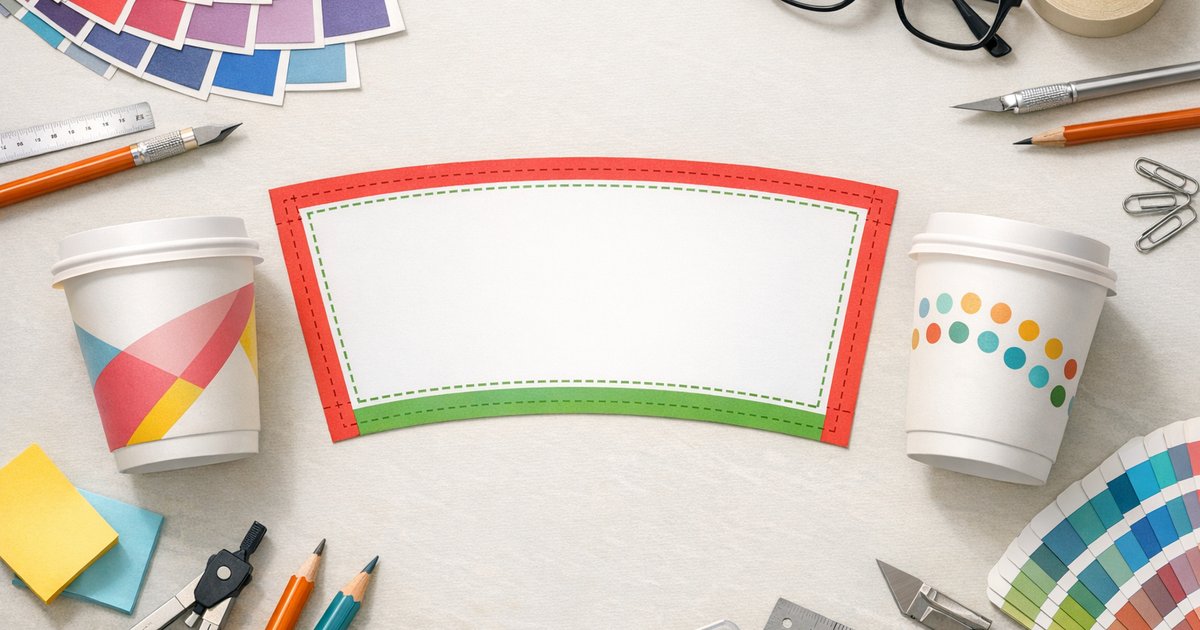
What is a coffee cup print template? A coffee cup print template is the flattened dieline (a curved trapezoid) used to layout artwork for a tapered takeaway cup. It shows the trim line, a recommended 3mm bleed, the safe zone for logos and text, and the seam/glue overlap so artwork wraps correctly when the cup is formed. Always use the supplier’s exact template for single‑wall, double‑wall or compostable cups, and order a sample pack to check alignment and colour before full production — minimum order is 500 cups.
Why this template matters
Using the correct coffee cup print template prevents trimmed or distorted artwork and shows where to keep logos clear of the seam and curved edges. Suppliers supply separate dielines for different cup types and sizes, so match the template to the cup you’re ordering.
Template components — a quick guide
- Trim line: finished edge where the panel is cut — nothing critical should sit outside this line.
- Bleed: extra artwork beyond the trim (we recommend 3mm) to avoid white edges after trimming.
- Safe zone: inner margin to keep logos and text clear of trimming and curvature.
- Seam / glue overlap: a small overlap area (commonly 5–8mm) where panels join — avoid placing important artwork here.
How to place artwork on the dieline
Designs wrap 360° around a tapered cup. Think about how people hold and view a cup when placing marks:
- Front (primary view): place the main logo centred on the front panel and away from the seam.
- Sides: use repeating patterns or supporting graphics; avoid important text near the seam.
- Back / seam: position the seam at the rear where possible so the front is uninterrupted.
Vertical lines may look tilted after forming because the flat template compensates for taper — always request a physical sample if alignment or colour is critical.
File setup: formats, colour and resolution
Follow these production standards to avoid delays:
- Supply artwork in CMYK — we print full‑colour CMYK.
- Use vector formats (AI, PDF, EPS) for logos and text. For images use high‑res PSD or TIFF at 300 dpi.
- Outline fonts or embed them; include any linked images at original resolution.
- Include 3mm bleed and respect the template’s safe zone and seam overlap.
We provide free AI and PSD templates and a design layout service — upload your logo and our team will place it into the correct dieline for you.
Recommended margins (quick reference)
| Item | Recommendation | Why |
|---|---|---|
| Bleed | 3mm | Prevents white edges when trimmed |
| Safe zone (top/bottom) | 5–10mm | Protects text and logos from curvature or trimming |
| Seam overlap | 5–8mm | Secure join; avoid placing key elements here |
Common problems and fixes
White rim after trimming
Cause: insufficient bleed or thin outlines close to the trim. Fix: extend backgrounds into the 3mm bleed and avoid thin high‑contrast lines near the trim line.
Logo cut off or too close to the seam
Cause: artwork placed in the seam overlap. Fix: move logos at least 10mm from the seam or request the seam be placed at the rear of the cup.
Artwork looks distorted on the finished cup
Cause: using the wrong flat template for the cup style or size. Fix: download the correct dieline for single‑wall, double‑wall or compostable cups and order a physical sample to check alignment.
Where to download templates and get help
Each cup model has its own dieline. Download free artwork templates (AI & PSD) and design guides from our custom printed coffee cups product page. If you’d rather, upload your logo and our design team will prepare a print‑ready layout.
Read the full buyer’s guide for Australian businesses on custom printed coffee cups in Australia.
Production details — what to plan for
- Minimum order: 500 cups
- Cup sizes: 8oz, 12oz, 16oz (16oz available as single‑wall only)
- Cup types: Single‑wall (PE), Double‑wall (PE), Compostable (PLA/CPLA)
- Printing: Full‑colour CMYK
- Standard production: 10 business days + 2–3 days metro freight
- Rush production: 5–7 business days
- Lids: PS, fibre and CPLA options
- Free: artwork templates
For current prices, see the printed coffee cups page.
Artwork checklist before you upload
- Download the correct cup template for your cup type and size from the product page.
- Set the document to CMYK and 300 dpi (or supply vector files).
- Include 3mm bleed and keep important elements inside the safe zone.
- Keep logos and critical text 5–10mm from top/bottom trim and 10mm from the seam.
- Leave the seam/glue area clear of critical artwork.
- Outline fonts or embed them and supply source files for complex artwork.
- Order a sample pack or printed proof to check fit and colour before production.
Need help or want a mockup?
If you’re unsure which template matches your cup, download templates from our product page, read the complete buyer’s guide on custom printed coffee cups in Australia, or order a sample pack to see your artwork on a real cup. Our design team offers a layout service so you can approve artwork before you place a 500‑cup order.
Ready to get started? Visit the printed coffee cups product page for templates, pricing and quotes, or request a sample pack to check fit and colour before ordering.